Your MCP endpoint
StackJack exposes your entire MSP stack to AI tools through a single MCP endpoint. MCP (Model Context Protocol) is the open standard AI assistants use to call external tools — when your AI tool "connects to StackJack," it is connecting to this endpoint.
The one URL
https://mcp.stackjack.io/mcp
That is the whole address. There is:
- One URL for your whole workspace — every connector you have set up (HaloPSA, ConnectWise, NinjaOne, and so on) is served through the same endpoint. You never get a different URL per connector.
- One URL for every team member — who you are is determined by how you sign in or which credential you use, never by the URL.
- One URL for every AI tool — Claude, ChatGPT, Cursor, VS Code, n8n, and any other MCP-capable tool all point at the same address.
Where to find it in the portal
- Sign in to the portal and open MCP Setup in the left sidebar (the
/endpointspage). - The top of the page shows two endpoint cards. The Standard endpoint card holds the URL above with a Copy button — that's the one most tools use.
The same URL also appears on the Dashboard and inside the first-login setup wizard.
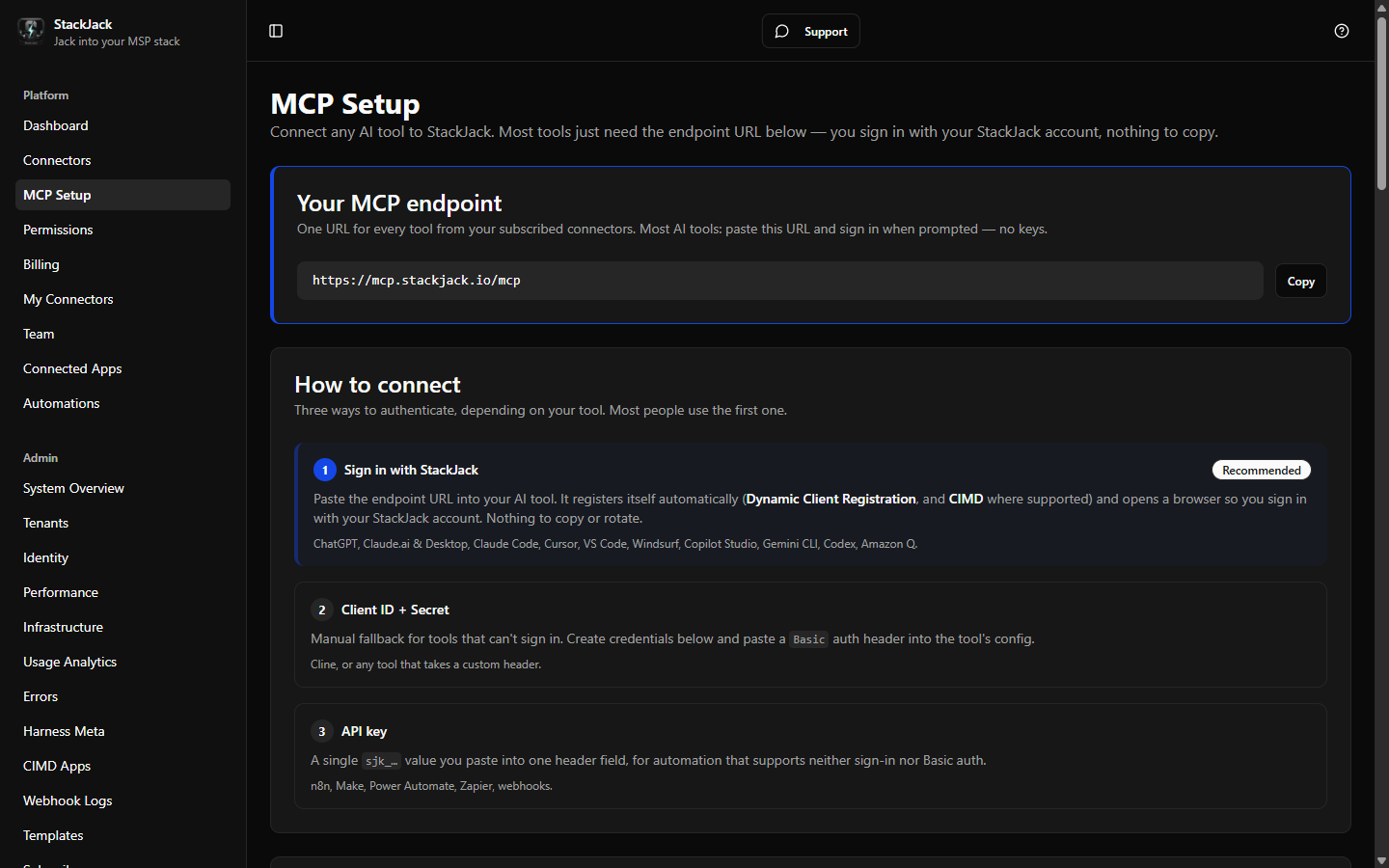 The Standard endpoint card at the top of the MCP Setup page, showing the URL and Copy button
Standard and compact endpoints
The MCP Setup page shows two endpoint cards side by side:
- Standard endpoint —
https://mcp.stackjack.io/mcp, the URL above. It serves your full tool catalog. This is the right choice for almost every tool. - Compact endpoint —
https://compact.stackjack.io/mcp, a slimmed tool list for AI tools that cap how many tools they load (Microsoft Copilot Studio, Cursor, VS Code Copilot). It serves the meta search/run tools plus any tools you pin.
The compact endpoint has a prerequisite: it does nothing until an administrator turns on catalog modes for your organization. Until then the compact card shows a "Requires setup" state, its Copy button is disabled, and — because catalog modes are off — the compact host would serve the full catalog anyway, exactly like the standard endpoint. Once catalog modes are enabled (there's an Enable catalog modes action right on the card for admins), the card flips to Ready and the compact URL becomes copyable. See Catalog modes for the full explanation and per-tool guidance.
Transport: Streamable HTTP
The endpoint speaks Streamable HTTP, the current standard MCP transport. Any tool that supports "MCP over Streamable HTTP" (sometimes just labeled "HTTP") can connect. If your tool asks you to choose a transport, pick Streamable HTTP — not SSE, not stdio.
When a tool connects successfully, it identifies the server as StackJack ("Jack into your MSP stack with AI") with the StackJack logo.
What your AI tool sees after connecting
The tool list your AI assistant receives is filtered for you specifically:
- Only tools from connectors your workspace has active subscriptions for.
- Only tools included in each connector's plan tier.
- Only tools you personally have been assigned (owners and co-owners see every tool; members see the tools an admin granted them). If the connection uses a manual credential with a restricted tool list, that list further limits the result — for owners too.
Two people connecting the same AI product to the same endpoint can therefore see different tool lists — that is by design.
Health check
The MCP server publishes an unauthenticated health endpoint you can use to verify connectivity from any machine:
https://mcp.stackjack.io/health
A plain HTTP GET (browser or curl) returns a healthy/unhealthy status. If this responds but your AI tool cannot connect, the problem is authentication or tool configuration, not the network — see Connection troubleshooting.
Rate limits
There is no per-minute or burst rate limit on the endpoint today. The enforcement point is your monthly plan cap — each connector subscription has a monthly tool-call allowance based on its plan tier. Usage against those caps is visible on the Dashboard and Billing pages.
Next steps
- How AI tools authenticate to StackJack — pick the right connection method.
- On the MCP Setup page, the Connect your AI tool card has an Open the setup guide button that takes you straight to these step-by-step guides for every supported tool (ChatGPT, Claude, Cursor, VS Code, Copilot Studio, n8n, and more). The per-tool tabs that used to live on that page have been replaced by these guides so the steps stay in one place and current.