Credits: Balance, Buying Packs, and BYOK
Automations are billed in credits. Credits abstract the underlying AI costs (model tokens plus active runtime) into simple dollars: 1 credit currently equals $0.10 of usage. StackJack may adjust the credit value over time; current credit-pack pricing is always shown in the portal.
The credits surface lives on the Credits tab of the Automations area (the old /credits address redirects there).
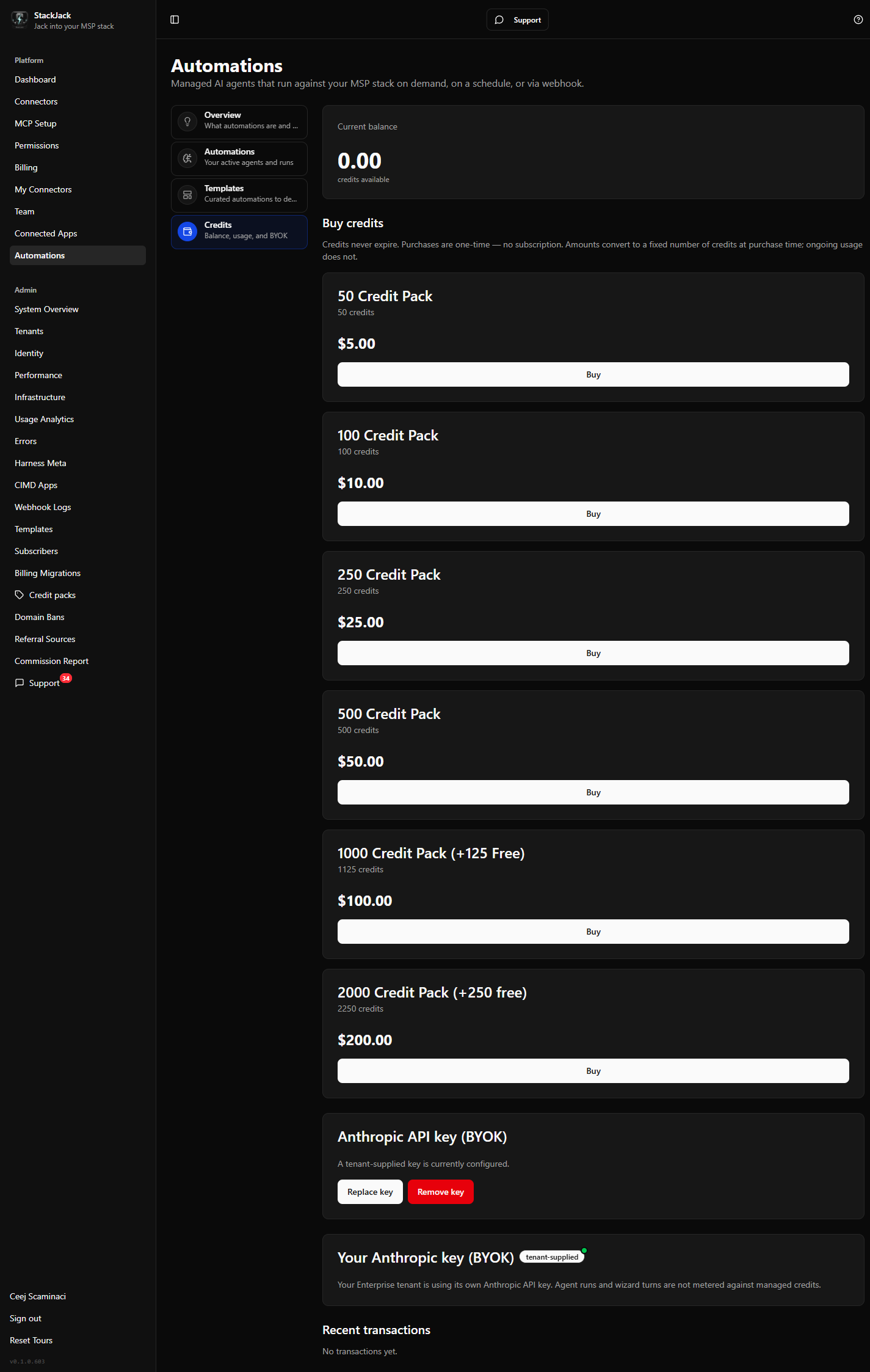 The Credits tab showing a positive balance, the Buy credits pack grid, the key-mode indicator card, and the Recent transactions table.
Your balance
The Current balance card shows your tenant's available credits. Every run draws from this balance:
- Before a run starts, StackJack reserves up to the automation's Max credits per run. If your balance can't cover the reservation, the run is recorded as CreditExhausted and nothing is charged.
- When the run finishes, the reservation settles to actual usage — unused reservation is refunded.
- Max credits per run is a hard cap: a run that reaches it is wrapped up, and you are never billed above the cap for that run.
Buying credit packs
Credit purchases are made by the account owner (or a co-owner). Other team members see a notice asking them to contact the owner.
- Open the Credits tab and find the Buy credits section. Each pack card shows its name, the number of credits, and the price.
- Click Buy on a pack. A secure Paddle checkout opens in a new tab (Paddle is StackJack's payment provider).
- Complete the checkout. Credits land on your balance automatically once payment is confirmed.
Things to know:
- Credits never expire.
- Purchases are one-time — buying a pack is not a subscription.
- The credit amount is fixed at purchase time by the pack you chose.
- If the portal cannot safely link the checkout to your tenant before opening it, it refuses to open the checkout and asks you to retry — this protects you from a payment that credits could fail to land for. The message includes a transaction reference for support.
Debt state (negative balance)
In rare cases a run's final usage can exceed what was reserved, driving the balance negative. When that happens:
- The balance is shown in red with an Account in debt alert.
- New runs are paused until the debt is resolved.
- The Buy credits section is intentionally hidden — settling a debt requires a quick review, so contact support@stackjack.io and the team will sort it out with you.
Recent transactions
The Recent transactions table shows your last 20 credit movements: date, type, description, the signed amount (green for additions, red for deductions, to four decimal places), and the balance after each. Purchases, per-run deductions, refunds, and manual adjustments all appear here. If your tenant uses BYOK (below), runs appear as zero-amount audit entries.
Bring your own Anthropic key (BYOK) — Enterprise plan
Enterprise tenants can supply their own Anthropic API key instead of running on StackJack-managed AI credentials.
Effect of turning BYOK on: automation runs (and AI-assisted build steps like wizard turns) are billed directly to your Anthropic account and are not metered against StackJack credits. Your balance stops being consumed while a key is active.
A key-mode indicator card on the Credits tab always shows which mode you're in:
- Managed Anthropic credentials — the default; every run is metered against credits.
- Your Anthropic key (BYOK) — a tenant-supplied key is active; runs are not metered against credits.
Set, replace, or remove the key (owner only)
- On the Credits tab, find the Anthropic API key (BYOK) card (shown only for Enterprise tenants; non-owners see a read-only notice).
- Click Set key (or Replace key), paste your key (Anthropic keys start with
sk-ant-), and save. - The key is stored in Azure Key Vault. It is never displayed again — not even masked. StackJack never logs the key value.
- To go back to managed credentials, click Remove key and confirm. You can set a new key at any time afterwards.
If a section fails to load
Each section has its own error banner with a Retry button and a support code: SJ-BAL-* (balance), SJ-PK-* (pack catalog), SJ-TX-* (transactions). These are almost always transient — retry, and contact support with the code if one persists.