Credits and Credit Packs
Credits are a prepaid balance that pays for StackJack's AI automation features. They translate the underlying AI model costs (tokens and runtime) into simple dollar terms: 1 credit is worth $0.10 today. StackJack may adjust the credit value over time; the packs you see at purchase always state exactly how many credits you get for the price shown.
What consumes credits — and what doesn't
Credits fund the Automations features only:
| Consumes credits | Does NOT consume credits |
|---|---|
| Agent runs (managed AI agents executing) | Connector tool calls from your AI assistant (those count against your plan's monthly allowance instead) |
| Agent-builder wizard turns (the chat that helps you build an agent) | Support tickets and StackJack's own support AI |
For each agent run, StackJack reserves credits up front (up to the agent's configured per-run maximum), then settles to the actual cost when the run finishes — unused reservation is refunded automatically. If your balance can't cover the reservation, the run is refused before it starts rather than stopping halfway on a surprise.
Enterprise accounts can bypass credits entirely by supplying their own Anthropic API key — see Bring your own Anthropic key.
Where credits live
Credits are managed on the Credits tab of the Automations area. Note that Automations appears in your sidebar only when agentic orchestration has been enabled for your account — StackJack enables it on request; contact support if you don't see it.
The tab shows, top to bottom: your current balance, the credit packs you can buy, your Anthropic key mode (managed vs. your own key — Enterprise accounts also see the BYOK key-management card here), and your recent transactions.
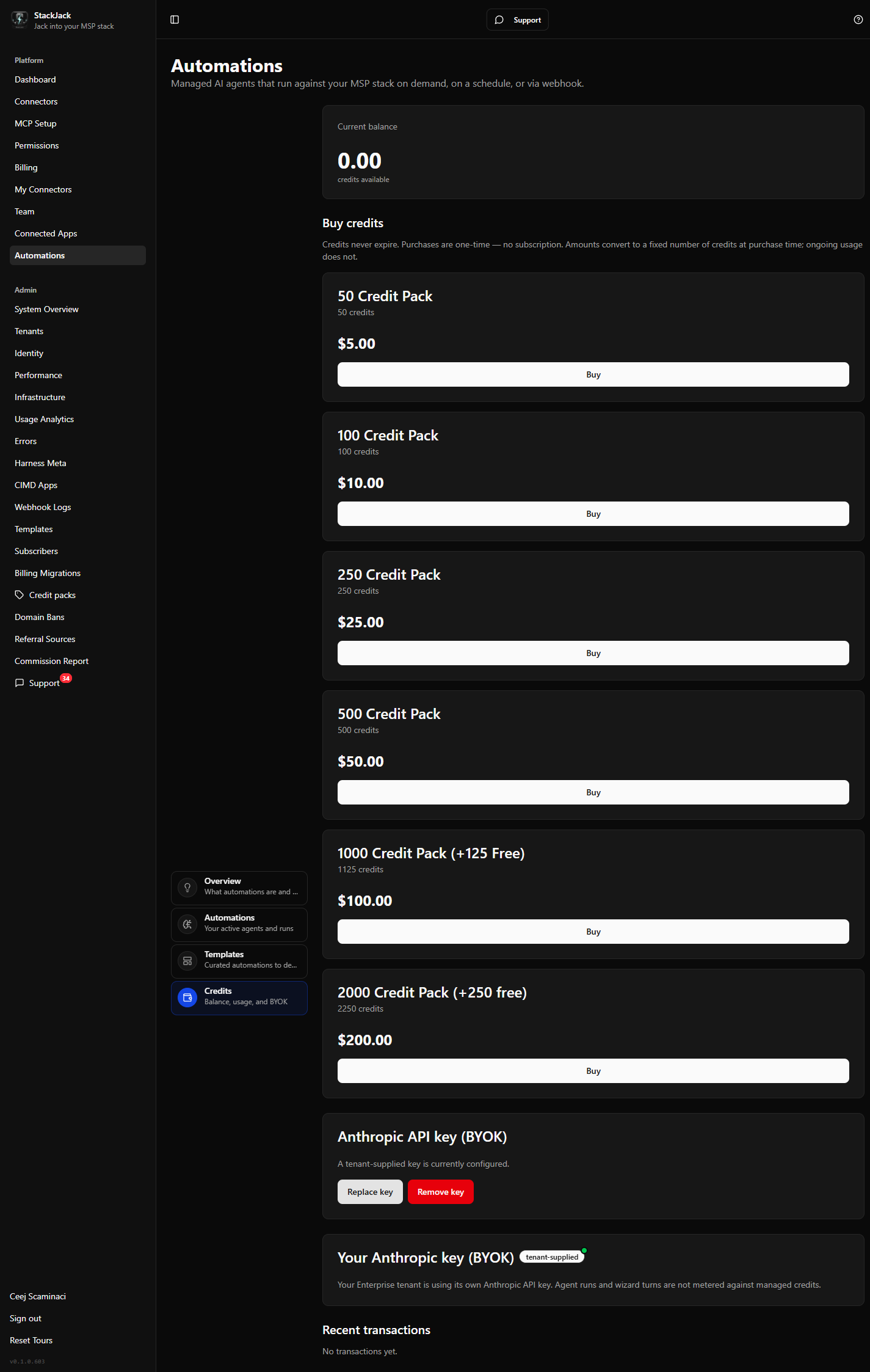 The Credits tab showing a positive balance card, the credit-pack cards with Buy buttons, and the "Managed Anthropic credentials" indicator card.
Buying credits
Only the primary owner and co-owners can buy credits (other members see a note to contact their owner). Purchases are one-time — there is no credits subscription — and credits never expire.
- Open Automations → Credits.
- In Buy credits, pick a pack — each card shows the pack name, the number of credits, and the price.
- Click Buy. A secure checkout opens in a new tab (Paddle, the same provider as plan upgrades; your billing profile is created automatically on first purchase).
- Complete payment. Credits land on your balance automatically once the payment is processed — refresh the tab to see the updated balance and a Purchase entry in your transaction history.
The pack terms you clicked are locked in at that moment: even if the catalog changes between your click and the payment completing, you receive exactly the credits and price you saw.
If a pack shows "Checkout not yet configured", it isn't purchasable yet — pick another pack or contact support.
Transaction history
The Recent transactions table lists your latest credit movements: date, type, description, the signed amount, and the balance after each entry. You'll see entries such as purchases, run reservations and their finalizations, refunds of unused reservations, wizard-turn charges, and any adjustments applied by StackJack support.
If your balance goes negative
In rare cases a run's actual cost can exceed what was reserved, which puts the account into debt (a negative balance). When that happens:
- New agent runs are paused until the debt is resolved.
- The Buy buttons are hidden — this is deliberate, so a purchase doesn't quietly absorb the debt without it being reviewed.
- A banner directs you to contact support@stackjack.io to review and settle the balance.