What Are Automations?
An automation is a managed AI agent that works inside your MSP stack. You give it a job description (a system prompt), a specific set of tools it may use, and a trigger that tells it when to run. StackJack then hosts and operates the agent for you — you never manage API keys, servers, or model plumbing yourself.
Each automation is powered by Claude, Anthropic's AI model family. When an automation runs, the agent reads its instructions, calls the MSP tools you allowed it to use (through MCP — the Model Context Protocol, the open standard AI assistants use to call external tools), and works the task to completion. You can watch runs live, read full transcripts afterward, and stop a run at any time.
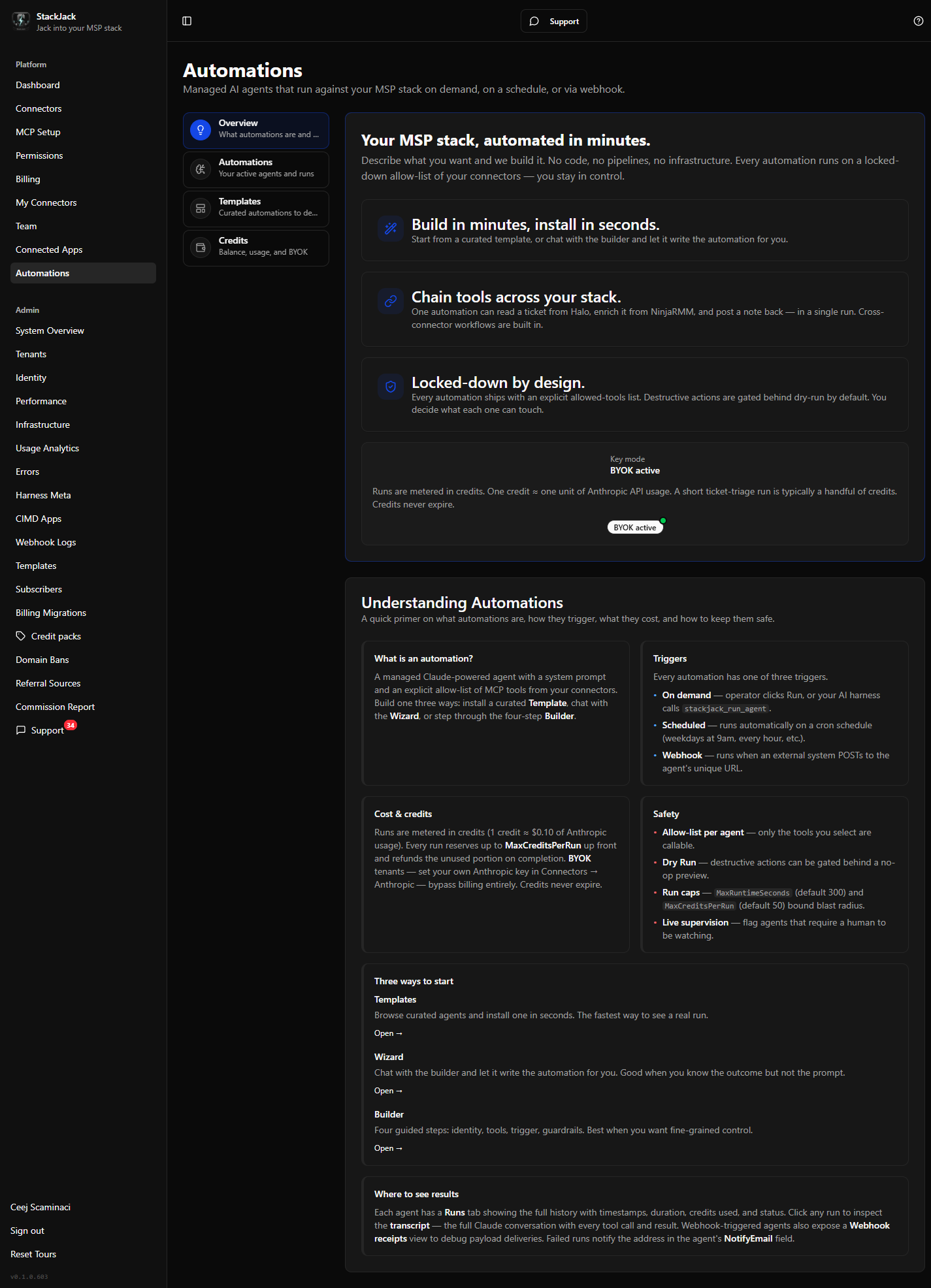 The Automations page Overview tab, showing the hero card and the "Understanding Automations" primer.
What an automation is made of
| Part | What it does |
|---|---|
| System prompt | The agent's standing instructions — its role, goals, and rules. |
| Model | Which Claude model powers the agent (see below). |
| Allowed tools | An explicit allow-list of MCP tools from your connected products. The agent can only call tools on this list — nothing else. |
| Trigger | When the agent runs: on demand, on a schedule, or when a webhook fires. |
| Knowledge | Optional durable context (pasted text and web page content) injected into every run. |
| Guardrails | Per-run limits: maximum runtime, maximum credit spend, dry-run mode, and required consent. |
The three triggers
Every automation has exactly one trigger type:
- On demand — you click Run now in the portal, or — if you have turned on the automation's Expose to external AI harness option (off by default) — your connected AI assistant starts it through StackJack's MCP tools.
- Scheduled — the automation runs automatically on a cron schedule (for example, weekdays at 9:00 in your timezone).
- Webhook — the automation runs when an external system (your PSA, RMM, an alerting platform, Zapier, and so on) POSTs to the automation's unique webhook URL, optionally passing payload data to the agent.
What runs cost: credits
Automation runs are metered in credits. Credits abstract Anthropic's token and runtime billing into simple dollars:
- 1 credit = $0.10 of usage today. This conversion is set by StackJack and can be adjusted over time.
- Before each run starts, StackJack reserves up to the automation's Max credits per run cap. When the run finishes, actual usage is calculated and the unused portion of the reservation is refunded.
- Credits never expire, and credit purchases are one-time — there is no subscription for credits. Current credit pack pricing is shown in the portal on the Credits tab.
- Bring your own key (BYOK): Enterprise tenants can store their own Anthropic API key. Runs then bill directly to your Anthropic account and consume zero StackJack credits.
You buy credits and review your balance and transaction history on the Credits tab of the Automations page.
Available models
Every automation uses one of five Claude models. Opus 4.8 is the default. The dollar signs are relative cost tiers, not prices — you pay in credits based on actual usage.
| Model | Model ID | Best for | Relative cost |
|---|---|---|---|
| Fable 5 | claude-fable-5 |
Frontier reasoning — the hardest tasks | \(\) |
| Opus 4.8 (default) | claude-opus-4-8 |
Strongest general reasoning | $$$ |
| Sonnet 5 | claude-sonnet-5 |
Near-Opus quality at Sonnet speed | $$ |
| Sonnet 4.6 | claude-sonnet-4-6 |
Balanced depth, speed, and cost | $$ |
| Haiku 4.5 | claude-haiku-4-5 |
Fast, high-volume, simpler tasks | $ |
Model choice is not plan-gated — every model is selectable on any plan that has Automations enabled. The plan you're on affects your credit balance and tool catalog, not which model you may pick.
Sonnet 5 and Sonnet 4.6 bill at the same credit rate, so choose Sonnet 5 when you want more of Opus's reasoning depth without leaving Sonnet's speed and cost. A model that is later retired keeps running and billing on existing automations until you switch it to a current one.
The safety model
Automations act autonomously against your production MSP tools, so several guardrails are built in and cannot be skipped:
- Explicit consent. Every way of creating an automation — wizard, builder, or template install — requires you to explicitly acknowledge that the agent will run autonomously on your behalf. An automation without accepted consent cannot run.
- Tool allow-lists. Agents start from zero tools. Only the tools you explicitly select are callable, and StackJack re-validates the list against your current plan and connector subscriptions on every save.
- Dry-run first. New automations default to dry-run mode: the agent's tool access is filtered to read-only tools, so it can look but not touch. You enable write tools with an explicit Promote to Production action once you have tested the automation.
- Runtime and spend caps. Each automation has a Max runtime (30–3,600 seconds, default 300) and a Max credits per run (0.01–500, default 50). The credit cap is strict — a run that reaches it is asked to wrap up and is stopped, and you are never billed above the cap.
- Sandboxed execution. The agent's execution environment is network-restricted: it can only reach StackJack's MCP server, not the open internet (unless you enable Anthropic's native web tools for it).
Tool approvals: not yet — automations run fully autonomously
Today, automations must be configured so all of their allowed tools run without a human approval step. If a run pauses waiting for a tool approval, the run fails with a message directing you to adjust the automation's tool policy to auto-allow its tools. Human-in-the-loop approvals — pausing a run so you can approve or deny a specific tool call — are coming soon.
Where to see results
Every automation keeps a run history showing when each run started, what triggered it, its status, and the credits and tokens it used. Opening a run shows full timing and usage detail, and from any run you can fetch the full transcript — the complete conversation including every tool call and result. Transcripts are fetched on demand from Anthropic and are not stored by StackJack, since they may contain your customers' data.
Three ways to build one
- Install a template — browse curated, ready-made automations and install one in seconds. The fastest way to see a real run. See Using Automation Templates.
- Guided wizard — chat with an AI wizard that interviews you until it has enough to build the automation for you. See Creating an Automation with the Guided Wizard.
- Advanced builder — a four-step builder with full control over knowledge, tool policy, and guardrails, plus a live test panel. See Creating an Automation with the Advanced Builder.