Triggers and Execution Guarantees
Automations start in one of three ways — on demand, on a schedule, or via webhook — plus two special paths (runs started by StackJack staff, and runs invoked by a connected AI assistant). This page explains exactly what execution guarantees each trigger gives you: what happens under load, whether triggers are queued or deduplicated, and how retries behave.
The execution-slot model (read this first)
The platform runs automations from a fixed pool of concurrent execution slots shared across all tenants. This is the one limit every trigger can hit:
- There is no queue. When all slots are busy, a new trigger is rejected or skipped — it is never held and executed later.
- There is no deduplication. Every accepted trigger starts exactly one run. If the same webhook is delivered twice, you get two runs. If a scheduled run is still executing when the next scheduled tick fires, a second run of the same automation starts alongside it (capacity permitting).
- Rejections are cheap and safe. A capacity rejection never charges credits and never leaves a partial run behind.
What each trigger does when the pool is full:
| Trigger | Behavior at capacity |
|---|---|
| Manual / API | HTTP 429 with retryable: true — try again shortly. The portal shows an "all agent slots are busy — try again in a moment" error. |
| Scheduled | The tick is skipped and recorded as a Skipped run (no retry). The next scheduled tick tries again. |
| Webhook | HTTP 429 with Retry-After: 30; the receipt is logged as CapacityExceeded. Your sending system should retry. |
On-demand (manual) runs
Trigger a run from the automation's page ("Run now"), optionally with free-text context for the agent.
- If you provide context, it is used as the kickoff message.
- If you don't, the automation's configured default context (set in its trigger configuration) is used. Explicit context always wins. Default context applies only to on-demand automations — scheduled and webhook runs never use it.
- Each run returns immediately with a run ID; you can watch live output as it streams.
Builder test chats are runs. Every message you send in the builder's test panel starts its own run — it is billed and counted exactly like any other run, and it appears in run history.
Scheduled runs
Scheduled automations run on a cron expression (5-field, minute precision) with an optional timezone.
What's guaranteed — and what isn't:
- Minimum interval: the schedule must fire strictly less often than once per minute. Every-minute or sub-minute cadences are rejected at save time with guidance to use a webhook trigger instead.
- Timezones: IANA and Windows timezone IDs are accepted; unknown timezones are rejected when you save. (If a timezone somehow becomes unresolvable later, the schedule falls back to UTC rather than stopping.)
- Best effort at the scheduled minute: if all execution slots are busy when the tick fires, that tick is skipped — the run is not queued for later. The skip is recorded as a Skipped run in your history, so a busy-platform drop is never invisible, and the next tick tries again. Design your schedules so a single missed tick is acceptable, or use a webhook trigger with sender-side retries for must-run work.
- Silent skips (no run record): a tick skips without leaving a run if the automation has been deactivated, archived, switched to a different trigger type, or if automations have been disabled for your tenant.
- Retries: genuine startup failures (for example a transient platform error) are retried automatically by the scheduler. Capacity skips are not retried — by design, so a busy platform doesn't multiply load.
- No overlap protection: a long run can still be executing when the next tick starts a new one. If your automation must not overlap itself, make its runtime cap shorter than the schedule interval.
Schedule drift and repair
If schedule registration fails when you save the automation, the save still succeeds — the automation is flagged with a schedule drift warning in the portal. Drift is repaired automatically the next time the platform restarts, or immediately via the Re-register schedule action on the automation. You can check registration state at any time from the automation's schedule status.
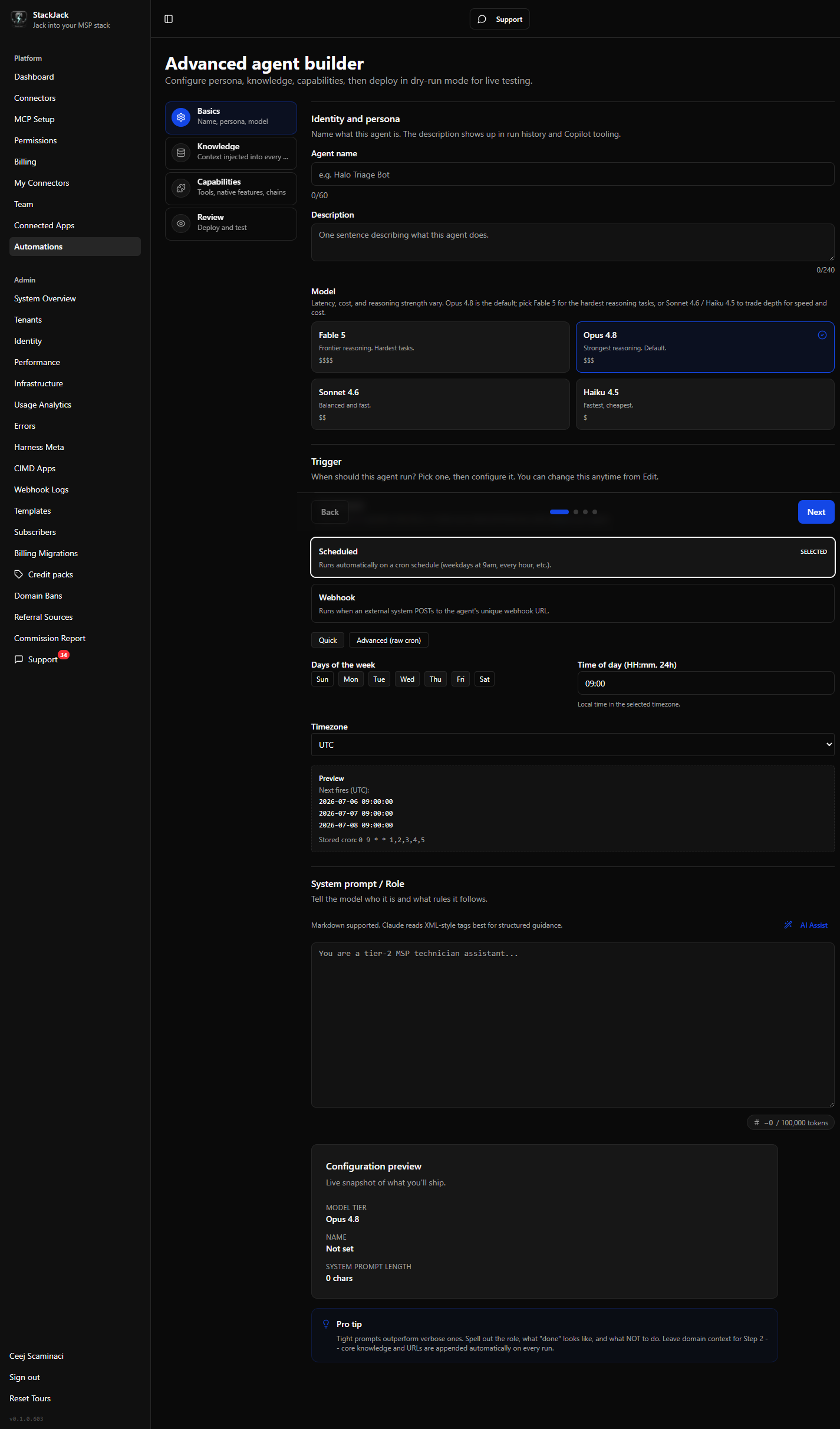 Schedule editor showing cron expression and timezone fields
Webhook runs
External systems (your PSA, RMM, Zapier, etc.) trigger the automation by POSTing to its unique webhook URL, optionally passing payload data to the agent.
Key guarantees, in brief (see the webhook ingestion contract for the full contract):
- Each accepted delivery = exactly one run (202 response with the run ID). No dedup — configure your sender accordingly.
- Per-automation rate limit: 10 invocations per minute. Beyond that, deliveries get HTTP 429 and no run starts.
- Rejected deliveries (bad secret, too large, rate-limited, at capacity) are never queued or replayed by StackJack — your sender owns retries.
- Every delivery outcome is recorded in the automation's webhook receipt log — except deliveries that 404 because the automation ID is unknown, inactive, or archived, which are deliberately not logged (scanner-noise defense). So you can audit exactly what arrived at a live automation and why it was accepted or rejected.
Runs started by StackJack staff
StackJack operators can run an automation on your behalf for support and diagnostics. These runs:
- appear in your run history like any other run (the staff attribution is recorded on the run and visible to StackJack operators; your portal does not currently badge them),
- never charge your credits (credits consumed shows 0), and
- still record token usage for transparency.
Runs invoked from a connected AI assistant
An automation marked "Expose as MCP tool" can be discovered and run by your own AI assistant (a harness — the app hosting the AI, such as Claude) through your StackJack MCP endpoint. Only on-demand automations can be exposed this way. The run executes under the same slot, billing, and guardrail rules as a portal-triggered run.