What is StackJack?
StackJack connects your AI assistant to the tools you already run your MSP (managed service provider) on. It is a hosted gateway built on the Model Context Protocol (MCP) — an open standard that lets AI applications like ChatGPT, Claude, and Cursor securely call external tools. Instead of wiring each AI app to each vendor API yourself, you connect your PSA, RMM, and documentation platforms to StackJack once, and every AI assistant on your team reaches all of them through a single URL: https://mcp.stackjack.io/mcp.
Under the hood, StackJack translates your AI assistant's requests into real API calls against 34 supported MSP platforms: HaloPSA, ConnectWise PSA, ConnectWise Automate, ConnectWise Sell, Autotask PSA, NinjaOne, N-able N-central, Datto RMM, Action1, Addigy, Syncro, CIPP, IT Glue, Hudu, Liongard, Huntress, Telivy, Cisco Meraki, Cisco Umbrella, ESET PROTECT, Pax8, Kaseya Quote Manager, Atera, Gorelo, ImmyBot, intelliGRC, Keeper Security, Sherweb, Slide, SuperOps, CyberCNS, CyberQP, DefensX, and Reddit Ads. Each connector exposes a family of ready-made tools — over 6,700 across the platform — so your assistant can look up tickets, check device health, search documentation, pull quotes, and much more, using your own credentials for each vendor. You stay in control the whole way: per-connector plans decide which tools are available, and per-user tool assignments decide who on your team can use them.
Everything is managed from the StackJack Portal at https://portal.stackjack.io. That is where you sign in, connect your MSP tools, get your AI assistant set up, invite teammates, watch usage, and manage billing. Tenants who want to go further can ask StackJack to enable Automations — managed AI agents that run on schedules or triggers without a human at the keyboard.
Where to go next
- New here? Create an account: Create a free account or Buy a plan on stackjack.io.
- Already have an account? Walk through your first sign-in.
- Just signed in? The setup wizard takes you from zero to a working AI connection.
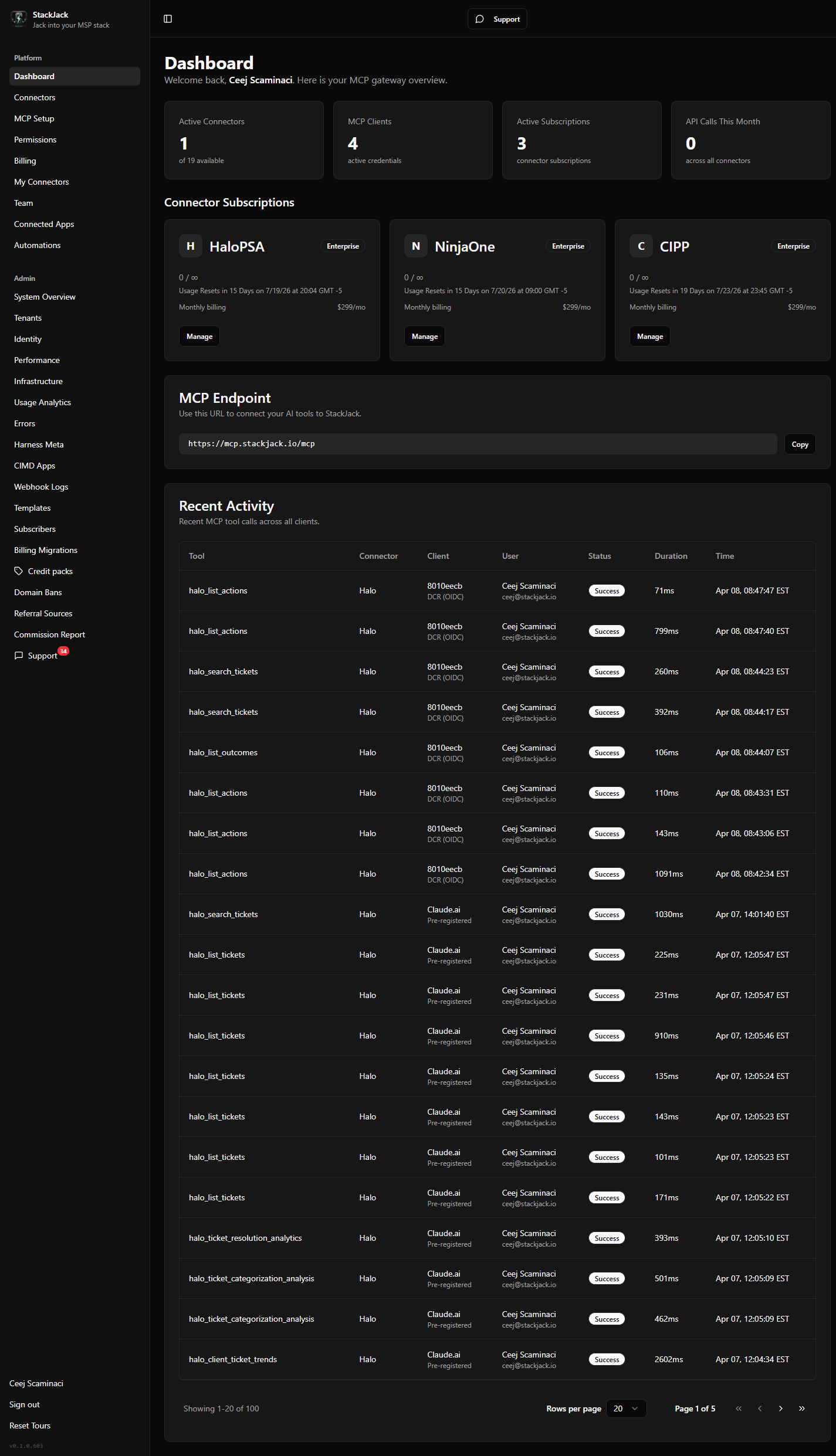 The StackJack Portal Dashboard for a configured tenant — sidebar visible, summary cards populated, and the MCP endpoint card showing https://mcp.stackjack.io/mcp