AI Governance Govern your MSP. Then govern your clients.
Start with your own team: see which AI tools your people use, decide which are allowed, and keep the evidence. It is free for your own organization, up to 10 staff. Then run every client the same way, from one table, through the tools you already run.
Public beta means anyone can sign up and buy today while we keep building, so screens and features can still change.
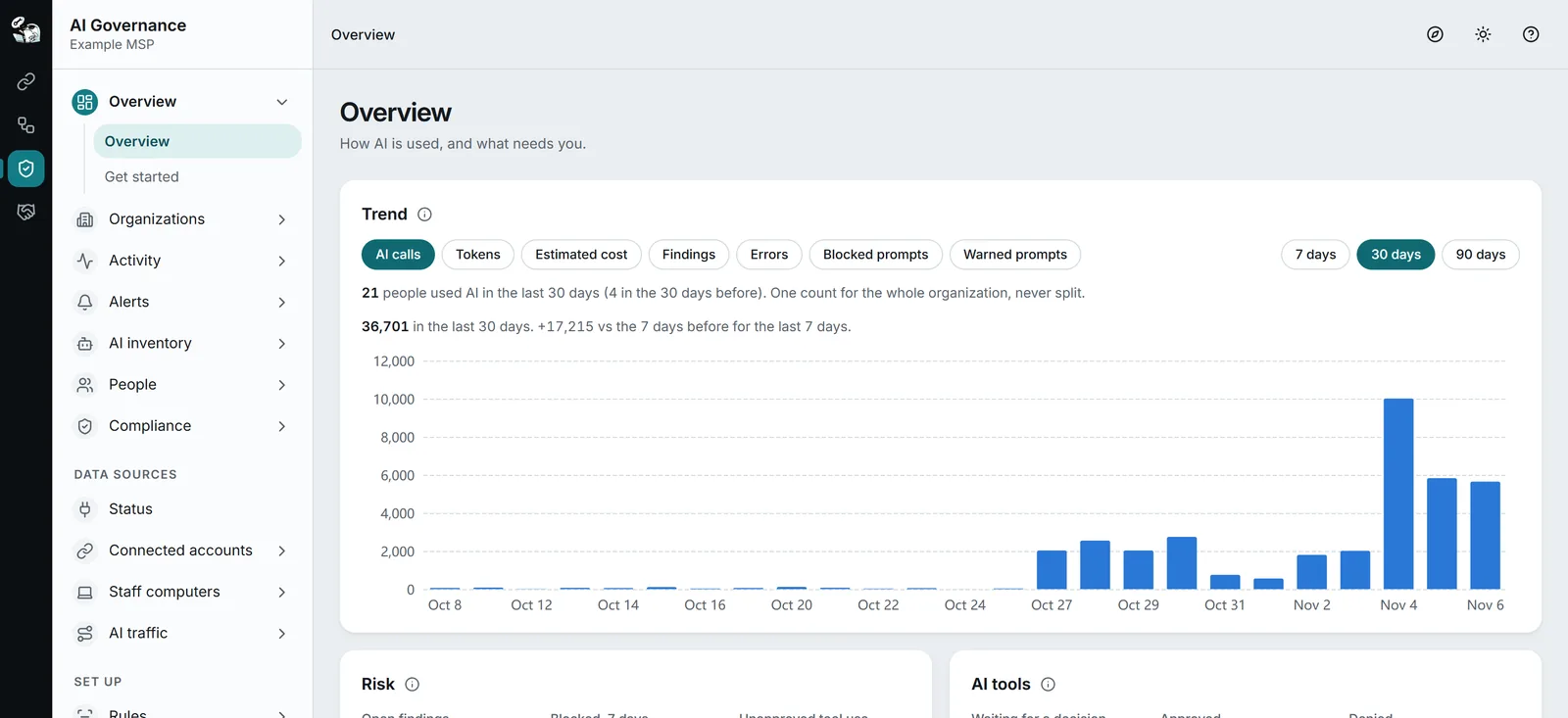
Start with your own team.
Add your clients when you are ready.
One product covers your own MSP and the clients you already have, from the first day. Nobody has to be prospected first. The exposure scan needs no install and no contract, and it makes AI Governance easy to sell to the clients you have and to the ones you want.
Get your own house in order.
Your staff, your AI tools, what is allowed, and the evidence. Scanning your own organization for AI exposure is free.
- Connects to what you already run: Microsoft 365, AI vendor accounts, your security tools and your PSA
- Evidence mapped to frameworks, to hand to an auditor or an insurer
- A browser extension and an endpoint agent for those who need them
Every plan, Free included
Run every client from one table.
Each client gets its own organization, with its own people, rules, roles and records. One table shows who needs you first. Findings, alerts and evidence keep arriving, and nobody has to open each client to find them.
- Rules start in test mode and go live when you trust them
- Deploy a standard AI set-up at a client after the right person approves it, and keep it in place
Pro and higher. $29 a month for each client on Pro
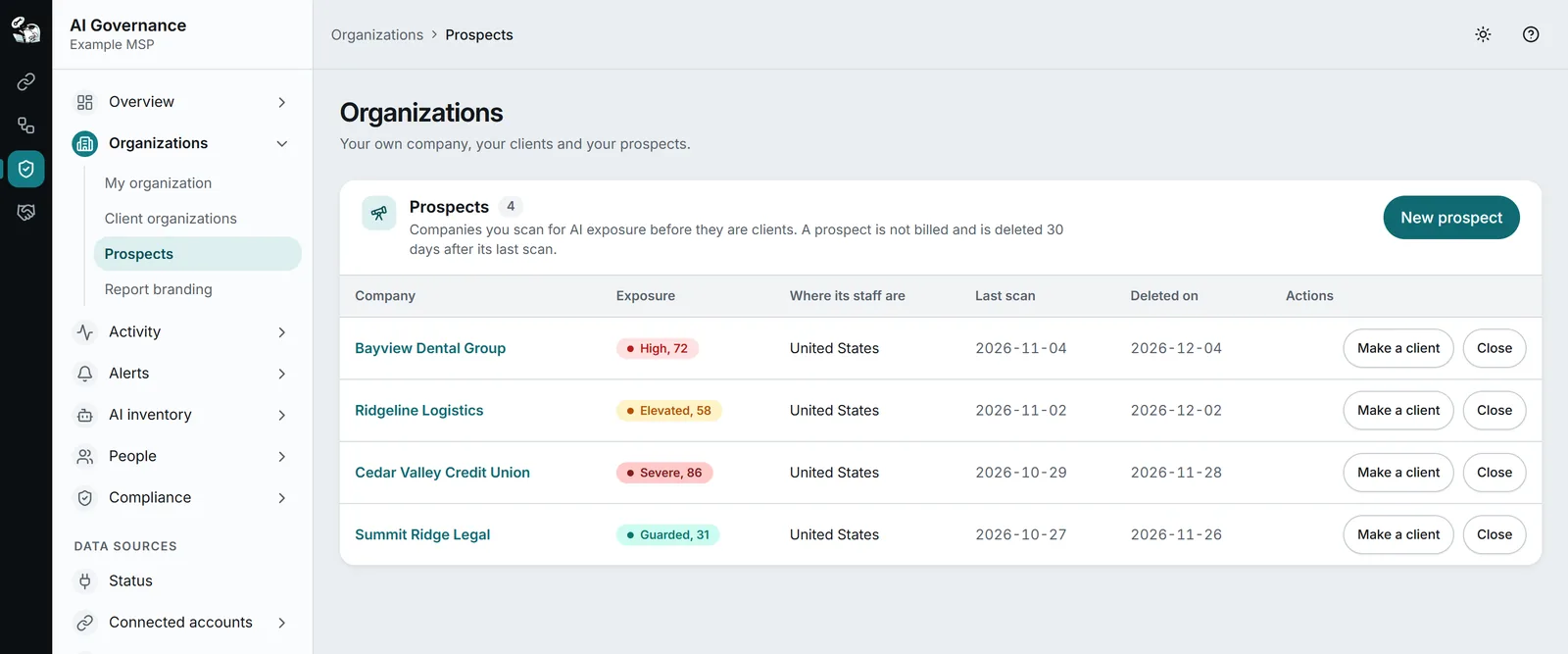
Show any company its own numbers.
Send a company’s Microsoft 365 administrator a consent link. StackJack reads settings, licenses, usage and the audit log, scores the company and writes a report under your name. It names the people and apps behind each finding, so the meeting starts with facts. Use it with a client you already have, or with a company that is not a client yet.
- Nothing to install, and no setting changes in their tenant
- Read-only consent that works once and expires in 72 hours
- A PDF with your logo and colors, or a full screen view for the meeting
Pro and higher. A prospect is never billed
See it. Control it.
Prove it.
AI Governance helps you see, control and prove how AI tools are used at work. Data comes in from your AI tools. StackJack turns it into facts. Rules look at the facts. A rule that matches makes a finding. Findings and problems raise alerts. The facts, findings and decisions become the evidence you hand over.
- Who uses which AI tool?
- Sources bring the facts in. The Activity pages and the AI tool inventory show them.
- What does it cost?
- The Spend page adds up estimated cost and vendor-reported cost.
- Is anything risky happening?
- Rules scan the text, and a match becomes a finding. Alerts tell you.
- Who decides what is allowed?
- Staff ask for tools. An administrator approves or denies. Policies and training set the rules for people.
- Can you prove it?
- Readiness, report packs and the audit trail give you evidence you can hand over.
MSPs
Govern AI use for each client in its own organization inside your account, with that client’s own staff, rules, roles and records kept apart from every other client. Scan a client, or a company that is not a client yet, and send a report under your own name.
Clients, and any company with staff who use AI
See which AI tools your people use, decide which are allowed, and keep the evidence a client, an auditor or an insurer asks for. A client’s own administrator, reviewer or auditor can sign in and see that client only.
For your role.
What it changes for each person on your team.
Pick your role. Each one has the problem in that person’s words, four outcomes and one screen. The screens are recreated with sample data and invented companies.
Owner / CEO
The problem
Clients ask what we do about AI, and I cannot answer for my own team yet.
- See which AI tools your own people use, what they cost and which are allowed. Free for your own organization, up to 10 staff.
- One table for every client shows who needs you first: setup, health, open findings, new tools and spend. Pro and higher.
- A cost you can plan: $29 a month for each active client organization on Pro, and a client’s people are never counted as staff.
- Show a client, or a company you want as one, its own AI exposure with a scan and a report under your name. A prospect is never billed. Pro and higher.
2 of 4 clients have open findings
1 client needs setup. 1 client has a source problem.
| Organization | Health | Open findings | New tools waiting | Spend, 30 days |
|---|---|---|---|---|
| Your MSPYour own organization | Working | 2 top: Medium | 5 | $640.30 |
| Acme ManufacturingClient organization | Needs attention | 7 top: High | 9 | $1,284.15 |
| Northwind DentalClient organization | Working | 12 top: High | 3 | $412.60 |
| Contoso LegalClient organization | Working | 0 | 1 | $96.20 |
| Fabrikam EngineeringClient organization | Waiting for data | 0 | 2 | $18.40 |
The All clients page, recreated. The table counts and never lists a person.
Service manager and techs
The problem
An alert says client data went into an AI tool. Which client, and what do I do next?
- Alerts arrive where the team works: a ticket in your PSA, Microsoft Teams, Slack or a signed webhook on Pro. Email and the Portal inbox are on every plan.
- A finding names the rule and never shows the matched text. Assign it, review it and close it with a reason. Pro and higher.
- Staff ask for an AI tool with a reason, and an administrator decides with one click. Every plan. Approving from Teams needs Pro.
- Ask from the AI tool your team already uses, and make everyday decisions there if your organization allows it. Every plan.
| Client | What | Where it stands |
|---|---|---|
| Acme Manufacturing | Finding, High: Information that belongs to a client | Open, not assigned |
| Northwind Dental | Alert: Unapproved AI tool | New |
| Contoso Legal | Alert: a source stopped reporting | New |
A recreated chat with StackJack’s own AI Governance tools. Opening a ticket needs Pro, an administrator and a second factor.
vCIO / account manager
The problem
The client asks whether they are safe with AI. I have an opinion, and I need their numbers.
- Scan the client’s Microsoft 365 with read-only consent. Nothing to install, and no setting changes. A client or a prospect needs Pro.
- Hand over a report under your name: two scores, the three worst findings, and the people and apps behind each finding.
- The first scan that read everything it was asked to read is the baseline. Each later scan shows what was added, removed and changed.
- Put a standard AI set-up in place after approval, see when a setting drifts, and see who holds each AI seat and what it costs. Pro and higher.
At least 41 of 87 people already use AI at work.
- CriticalCopilot is live and can reach everything
- CriticalAnyone can connect an AI app to their mailbox
- CriticalAn AI app reads company data with nobody signed in
The first page of the report, recreated with an invented company. The real page carries your logo and colors.
Security and compliance
The problem
The auditor and the insurer ask how we control AI. I have a policy file and no proof behind it.
- Readiness maps your evidence to seven frameworks and shows what is missing. Every plan. Readiness for each client is on Business and higher.
- Every change and every look at sensitive data is recorded in an audit trail that cannot be edited. Every plan.
- Dated report packs to hand over: the privacy pack on every plan, and the auditor, insurer and per-client packs on Business and higher.
- A finding never shows the matched text, StackJack does not rank or score named people, and names are hidden by default for staff in the EU and the UK.
StackJack’s mapping; not legal or audit advice.
The Compliance readiness page, recreated with sample figures. It shows four of the seven frameworks.
Walk into the meeting
with their own numbers.
A company rarely knows how far AI already reaches into its tenant. Show it, with the company’s permission and a report under your name. The scan works for a client you already serve and for a company that is not a client yet, and a later scan shows what changed since the baseline.
Seven jobs.
Each one has its own page.
The overview above is the short version. Each row opens the page that holds the detail, with the plan each part needs.
Govern your MSP.
Then govern your clients.
Four plans. Every feature has a listed price on Free, Pro or Business. Enterprise changes limits and bundles, never features. Every organization starts on Free. AI Governance is billed on its own, with its own invoice. Prices are in US dollars.
Govern your MSP
Pick the plan for your own staff.
Free
Find AI use, keep the AI tool inventory and get alerts by email. Free keeps no prompt text.
Start FreePro
Everything in Free, plus text scanning with rules, findings, alerts where your team works, and client organizations.
Start free, upgrade in the PortalBusiness
Everything in Pro, plus enforcement, the AI gateway, the incident register, alerts to your SIEM and legal holds.
Start free, upgrade in the PortalEnterprise
Everything in Business, with limits and bundles set for your deal. No feature needs Enterprise.
Talk to us about EnterpriseEvery feature of every plan is in the comparison below. You buy in the Portal, which shows the price before you pay. StackJack emails the account owner before the first charge for staff, stored text or client organizations. The invoice shows the final amount.
Keep it in your own storage
Your own storage is free on every plan, Free included.
In this example, storage with StackJack costs $1,200 a year. With your own storage as the main store, text that lives only in your storage is not on your StackJack bill: your storage provider bills you for it.
A copy does not end the charge
Pro and Business include no stored text: text stored with StackJack is $1 per GB a month from the first GB. An extra copy in your storage leaves StackJack’s copy in place, and that copy is still $1 per GB. Make your own storage the main store, and StackJack deletes its own copy after it proves each piece arrived. Text that lives only in your storage is not on your bill.
Your records go with it
With your own storage as the main store, your audit trail and report packs go to your storage too. While it runs, StackJack keeps the audit trail for 400 days and report pack files for 90 days. It removes its copy of an older record only after it proves the record is in your storage, and reads older records from your storage when you open them.
On Free too
Free keeps no prompt text. On Free, your own storage holds your records: the audit trail and report packs.
Then govern your clients
Add each client organization on Pro or higher. Client people are never counted as staff.
Charged apart from your plan
Client organizations need Pro or higher. If you still have an active client organization, you cannot move to a plan below Pro.
Client stored text
A client organization’s stored text is $1 per GB a month from the first GB.
No charge for client people
A client organization’s people are not counted as staff, and there is no fee for each person. On Enterprise, the price for each client organization is set for your deal.
Compare the plans
| Feature or limit | Free | Pro | Business | Enterprise |
|---|---|---|---|---|
| Your organization | ||||
| Price a month | $0 | $199 | $399 | Custom |
| Staff included | 10 | 25 | 50 | Set for your deal |
| Each person above your staff in a month | No charge | $5 | $4 | Set for your deal |
| Apps and automations included | 2 | 5 | 15 | Set for your deal |
| Every way to find AI use: sources, the Activity explorer, the Spend page and source health | Included | Included | Included | Included |
| The AI tool inventory, and tool requests that an administrator decides in the Portal | Included | Included | Included | Included |
| Staff see their own activity | Included | Included | Included | Included |
| Data requests from staff: a person’s export and the erasure decision | Included | Included | Included | Included |
| Governance from your AI tool: reading and, if you allow it, everyday decisions | Included | Included | Included | Included |
| The browser extension and the endpoint agent find AI sites and AI apps | Included | Included | Included | Included |
| Control by the browser extension and the endpoint agent, including the paste check and local AI tool control | Not included | Included | Included | Included |
| Scanning text with data-loss rules, and findings | Not included | Included | Included | Included |
| AI judgments (Jev) on the text AI Governance scans | Not included | Included | Included | Included |
| AI judgments (Jev) a month | Inventory only | 5,000 for each staff member | 5,000 for each staff member | Set for your deal |
| Enforcement on StackJack tool traffic: Block, Mask and Warn | Not included | Not included | Included | Included |
| The PII filter | Not included | Not included | Included | Included |
| Storage | ||||
| Your own storage: Azure Blob Storage, AWS S3, an S3-compatible store, Google Cloud Storage or SFTP | Included | Included | Included | Included |
| What StackJack charges for your own storage | $0 | $0 | $0 | $0 |
| Your own storage as the main store | Records only | Included | Included | Included |
| A verified copy in your own storage | Records only | Included | Included | Included |
| Stored text: the Masked text and Full text capture levels | Not included | Included | Included | Included |
| Text stored with StackJack, for each GB a month from the first GB | Not stored | $1 | $1 | Set for your deal |
| Facts kept | 30 days | 395 days | 395 days | 395 days |
| Stored text kept, at most | Not stored | 365 days | 1,095 days | No fixed maximum |
| Legal holds | Not included | Not included | Included | Included |
| Alerts and integrations | ||||
| Email alerts and the Portal inbox | Included | Included | Included | Included |
| Alerts to Microsoft Teams, Slack, your PSA ticket queue and a signed webhook | Not included | Included | Included | Included |
| Approving tool requests from Teams | Not included | Included | Included | Included |
| Scanning of StackJack tool traffic, as alerts | Not included | Included | Included | Included |
| Alerts to your SIEM: Microsoft Sentinel, Splunk HTTP Event Collector, syslog over TLS and OpenTelemetry export | Not included | Not included | Included | Included |
| The AI gateway, the MCP proxy and Claude Inference hooks | Not included | Not included | Included | Included |
| Changes in your AI vendor accounts, proposed in StackJack and approved by an administrator | Not included | Not included | Included | Included |
| Evidence | ||||
| The audit trail | Included | Included | Included | Included |
| Compliance readiness and the document templates | Included | Included | Included | Included |
| The privacy report pack | Included | Included | Included | Included |
| The AI use policy and acknowledgements | Not included | Included | Included | Included |
| AI training | Not included | Included | Included | Included |
| The incident register with notification clocks | Not included | Not included | Included | Included |
| The auditor, insurer and per-client report packs | Not included | Not included | Included | Included |
| The signature on report packs | Not included | Not included | Included | Included |
| Clients | ||||
| The exposure scan of your own organization | Included | Included | Included | Included |
| The exposure scan of a client or a prospect | Not included | Included | Included | Included |
| Client organizations | Not included | Included | Included | Included |
| Each active client organization, a month | Not offered | $29 | $49 | Set for your deal |
| A client organization’s stored text, for each GB a month from the first GB | Not offered | $1 | $1 | Set for your deal |
| Deploy and manage: standards, plans, approvals, drift, seats and purchases for your clients | Not included | Included | Included | Included |
| Readiness for each client organization | Not included | Not included | Included | Included |
Records are the audit trail and report packs. Free keeps no prompt text, so on Free your own storage holds records only. Enterprise has every feature of Business, and no feature needs it: its limits and bundles are set for your deal.
Good to know
Billed on its own
A separate subscription from your connector subscriptions, with its own invoice and its own billing date. Only the account owner buys, changes or cancels a plan. You can cancel at any time.
Where your records live
Unless your own storage is the main store, StackJack keeps the audit trail and report packs for at least six years. While your own storage runs as the main store, StackJack keeps the audit trail for 400 days and report pack files for 90 days, and older ones are only in your storage.
Vendor admin included
Anthropic Admin, OpenAI Admin and GitHub Copilot are included with a paid AI Governance plan at no extra charge. On Free you use your own subscriptions to them.
Who counts as staff
Staff means the people with AI activity in the month. Each person above your plan in a month is $5 on Pro and $4 on Business.
Apps and automations
An app or automation is a named non-person source of AI use, such as an internal tool that calls an AI vendor with API keys, or a scheduled job. It is free up to the number in your plan. Each one above that counts as one extra staff seat in a month in which it had activity: $5 on Pro, $4 on Business.
Moving down deletes nothing
Moving down never deletes or hides your records. They stay readable and only new writes are refused. The keep times of your old plan still apply for 30 days after a move down, so nothing is deleted at once.
Questions.
What does “public beta” mean here?
Anyone can sign up and buy today while we keep building, so screens and features can still change.
Where do I buy it?
In the Portal. Sign up, open AI Governance, and go to Settings, then Billing. Every organization starts on Free, and only the account owner buys a plan.
Do I have to prospect anyone to use AI Governance?
No. It works on your own organization and on the clients you already have, from the first day. The exposure scan is there when you want it: scan a client, or a company that is not a client yet, with a read-only consent link, and present the report under your name. A company that is not a client yet is a prospect. Prospects need Pro or higher, and a prospect is never billed. How the scan works.
Do I have to install anything?
Not for the scan, and not for most sources, which use connections and keys you already have. The browser extension and the Windows endpoint agent are there for those who need to see more.
Does AI Governance collect anything when I turn it on?
No. A new organization collects nothing until you add a source. For staff in the EU or the UK, collection also waits until you record how you told your staff. What it keeps and for how long.
Is AI Governance part of my connector subscriptions?
No. It is billed on its own, with its own invoice and billing date. Anthropic Admin, OpenAI Admin and GitHub Copilot are included with a paid AI Governance plan.
What does storage cost?
Your own storage is free on every plan, Free included. Text stored with StackJack is $1 per GB a month from the first GB on Pro and Business, and neither plan includes any. Free keeps no prompt text. With your own storage as the main store, the text and your records go to your storage. StackJack deletes its copy of each piece of text once it proves the text is there, and text that lives only in your storage is not on your bill. How your own storage works.
What happens to my records if I move to a lower plan, or close AI Governance?
Moving down never deletes or hides them. They stay readable and only new writes are refused. If you close AI Governance, export what you want to keep first: closing deletes what AI Governance holds for your organization, except the audit trail and the report packs. StackJack keeps what it holds of those for six years after you close. With your own storage as the main store, the older audit trail entries and report pack files are only in your storage: they stay there, and StackJack can no longer read them for you after the close.
Know what AI is doing.
AI Governance is in public beta. Start free, add one source, and see which AI tools your people use.