AI Governance Rules, alerts, evidence.
A rule that matches makes a finding. Findings and problems raise alerts. The facts, findings and decisions become the evidence you hand over.
Start in test mode.
Go live when you trust a rule.
A data-loss rule looks for something in the text of an AI use. When a rule matches, AI Governance records a finding. A finding names the rule. It never shows the matched text.
Ready-made packs
Secrets, cloud and platform secrets, the credentials an MSP pastes for its tools, personal data, payment cards, health records, special categories of personal data, controlled unclassified information markings, agent safety (prompt-injection markers in tool results), and client identifiers.
Write custom rules for what only your organization knows, and replay a rule on past data to see what it would have found.
Test, Live, Off
Test keeps findings and never alerts or changes stored text. Live makes findings count and applies the rule’s actions. Off stops the rule and keeps it in the list.
A Live rule can alert, mask the stored copy, open an incident (Business), open a ticket in your PSA, or block the call.
Warnings people can answer
A warned person sees a notice with a Continue button, or is asked for a reason before a send goes through. StackJack records that they continued.
A blocked person can ask your organization to approve the tool from the block page.
A second opinion
Your rules always run first. AI (Jev) can add a finding or raise a finding’s severity. It never removes a finding and never lowers a severity. When it is not sure, a person reviews the record.
It runs on a hosted AI service outside the European Union. EU or UK staff always need your opt-in before any text is sent. For other organizations the Portal says whether an opt-in is needed.
What AI agents may do
Agent rules decide what AI agents may do in your connected tools. A rule can allow a call, hold it until an administrator approves it, or block it, for example “no destructive tool without approval”.
Scan what flows through StackJack
StackJack can check what your AI tools send to your connected systems, and what those systems answer, against your rules. On Pro a rule raises an alert. On Business, Block refuses the call, Mask hides the matched value and Warn asks for a reason.
The PII filter makes a read tool answer blank instead of returning personal data.
Know what happened,
and who needs to act.
The Overview is the home page: a health strip, a band of what needs you, and cards for trend, risk, AI tools, coverage, compliance, spend and plan. Every number links to the page behind it.

Who used what, and when
The Activity explorer lists every recorded AI use, newest first, with filters. The Spend page shows estimated cost and vendor-reported cost side by side and never adds them together.
Work each finding
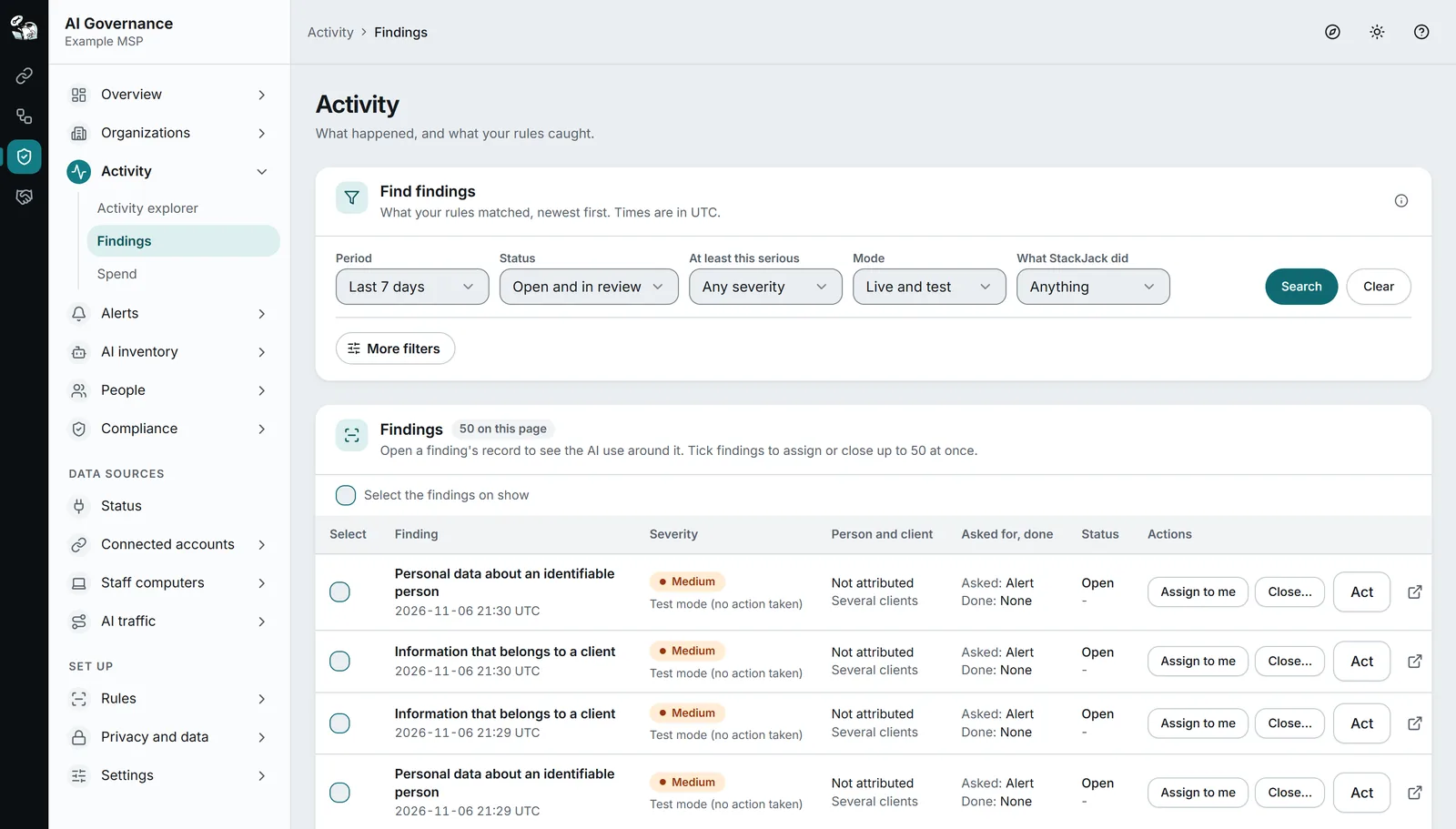
Filter by period, status, severity, rule, client, source or person. Assign a finding, start a review, and close it with a reason: remediated, false positive, accepted risk, duplicate or no action needed. Every change is in the audit trail.
Alerts where your team looks
Every alert is in the Portal inbox. Channels send alerts to email, Microsoft Teams, Slack, a ticket in your PSA or a signed webhook. A policy says which alerts go where. Quiet hours and digests are on a schedule you set.
Business adds forwards to Microsoft Sentinel, Splunk HTTP Event Collector, syslog over TLS and OpenTelemetry export.
Track it to a review
An incident has an owner, a status, a timeline, links to findings and clients, and a review that closes it. Some carry a notification clock for a legal deadline. Incident rules can open incidents for you from findings, alerts or AI activity.
Fix it in the vendor’s console
With your approval, AI Governance can remove a person who left, turn off a key that leaked, set a spend limit or cancel a seat in your Anthropic, OpenAI and GitHub Copilot accounts. Nothing happens by itself: an administrator turns it on for a connection and approves each change.
Gateway and MCP proxy
The AI gateway sits between your staff’s tools and OpenAI, Anthropic or Azure OpenAI, checks each call, counts cost and applies budgets, and uses your own vendor key so your people never see it. The MCP proxy checks each tool call to a remote MCP server you approved and holds that server’s credential.
Proof you can hand over
to a client, an auditor or an insurer.
Evidence builds as you use the other features. The packs list gaps instead of hiding them.
Evidence mapped to seven frameworks
EU AI Act (deployer duties), GDPR and UK GDPR, ISO/IEC 42001, ISO/IEC 27001, SOC 2 (Trust Services Criteria), NIST AI RMF and insurer questions. Each control lists the signals behind it and when the evidence was last fresh. A control is covered only when every signal is met.
It is StackJack’s mapping, not legal or audit advice, and it does not certify your organization.
An AI use policy staff accept
Publish one AI use policy from a template. Each version is frozen with a fingerprint and the list of tools approved that day. Staff accept in the Portal, from an emailed link, or on paper, and you see who has not.
Six short lessons, with a quiz
Using AI tools safely at work, keeping client data in your care, secrets never go into an AI tool, prompt injection and AI agents, tool access and permissions, and reporting an AI incident. Each quiz has an 80 percent pass mark. You can also record training done elsewhere.
Dated, write-once packs
A pack is a dated ZIP file: a PDF to read and CSV files with the underlying rows. A pack never holds the text of a prompt or an answer, a matched value or a masked token. Anyone can check on a public page that StackJack issued a pack.
- Privacy pack, for a regulator or a works council: every plan.
- Auditor pack, mapped to SOC 2, ISO 27001 and ISO 42001: Business and higher.
- Insurer pack, the answers a cyber-insurance questionnaire asks about AI: Business and higher.
- Per-client pack, which AI use touched one client’s data, never naming staff: Business and higher.
Packs are signed on Business and higher.
Who did what, and why
Every change and every look at sensitive data is recorded, and the record cannot be edited. Each entry is chained to the one before it, and a daily fingerprint is stored separately. Search by period, action or person, and export to CSV.
When a person asks “who has seen my data?”, the answer is one search.
Your AI register
The AI tool inventory is the base of your AI register: each tool with its vendor, owner, contract, data kinds, risk class and approval status, and the approved list in the policy you publish.
Questions.
Can I see the text a rule matched?
No. A finding shows the rule name and a masked token. Neither the Portal nor an AI tool shows the matched value.
Does it rank or score my staff?
No. AI Governance does not rank or score named people, and the inventory builds no score from who used a tool.
Does the readiness page certify my organization?
No. It maps your evidence to the frameworks your clients, auditors and insurers ask about. It is StackJack’s mapping, not legal or audit advice.
Keep reading.
For depth, in the docs: Rules, findings and scanning · Compliance readiness
Know what AI is doing.
AI Governance is in public beta. Start free, add one source, and see which AI tools your people use.