Beyond chat: put IT work on autopilot.
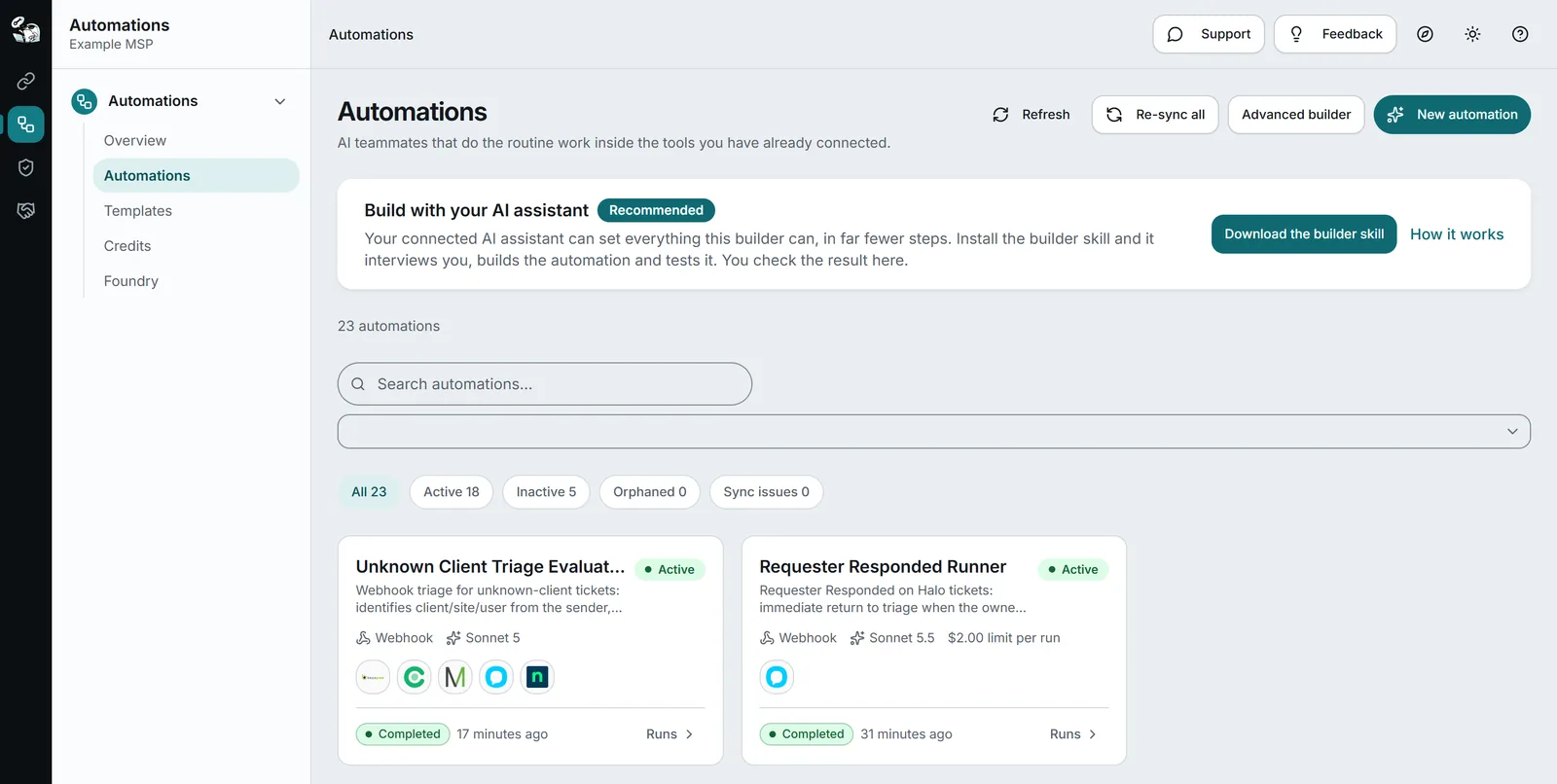
Automations are saved, reusable AI workers that run against your connected IT stack: on demand, on a schedule, or from a webhook. You write the job in plain English and choose the tools it may call. Describe the job to the wizard or to your own AI assistant, test it in dry-run, then read the full record of every run.
A saved AI worker, not a chat session.
An Automation is a persistent, saved AI worker. Configure it once: prompt, model, trigger, tools, guardrails and knowledge. It then runs repeatedly against your IT stack. It is closer to a managed workflow asset than a disposable AI conversation.
It’s a saved definition
Name, description, model, system prompt, trigger mode, scoped tools, runtime caps, and optional reusable knowledge, all versioned on every save.
It runs on its own schedule
Fire it on demand, on a cron schedule with timezone support, or from webhook payloads. Each run is tracked with a full execution record.
It’s bounded by design
Explicit tool allow-list, per-agent max runtime, per-run credit cap, dry-run mode, and server-side tenant validation, with no implicit trust surface.
Every run is visible
Status, summary, token counts, tool-call count, credits consumed, duration, trigger payload, and full transcript, all retrievable after the fact.
Four ways to build one
Install a template
Pick a ready-made automation and install it in seconds.
Guided wizard
Answer questions in a chat and the wizard builds it for you.
Advanced builder
Full control over knowledge, tools and guardrails, with a live test panel.
Your own AI assistant
Connect your assistant to StackJack and install the builder skill. It interviews you, builds the automation, tests it, and you check the result in the Portal.
What it changes for each person on your team.
Pick your role. Each one shows the problem, what an automation does about it, and the Portal screen you read afterward. The screens are recreated with sample data.
Owner / CEO
The problem
The same reviews get done by hand every week, and nobody can tell me what AI would cost to do them.
- Recurring reviews and triage run on a schedule or when a ticket arrives, with nobody starting them
- One flat runner plan: the AI runs on your Azure Foundry or your own Anthropic key, and your own cloud bills it
- Every run shows what it cost, and a limit you set stops a run that reaches it
- No code to write or host: describe the job in plain English, or install a template
Reviews open priority tickets and flags the ones close to their SLA before standup.
Gathers ticket history, device state and the runbook when a P1 arrives.
Builds one client’s review brief from tickets, hardware and MFA status.
Checks client documentation for missing and expiring records.
Service manager and techs
The problem
Every P1 starts with ten minutes of looking things up before anyone fixes anything.
- When a ticket arrives, an automation gathers the ticket history, the device state and the runbook, and posts them to the ticket
- A scheduled review flags the tickets close to their SLA before standup
- Test it in dry-run first: reads are real, and every write is blocked and recorded
- Switch on failure emails, and a failed run emails the address you picked
Tool sequence 6 tool calls · in order
- 1
halo_get_ticketREADok - 2
halo_list_ticket_actionsREADok - 3
ninja_get_deviceREADok - 4
ninja_get_device_alertsREADok - 5
hudu_search_articlesREADok - 6
halo_add_internal_noteWRITEok
Summary
Ticket 48231 triaged. Device: ACME-FS01 at Acme, disk 97% full, one active alert. History: two tickets for the same server in the last 30 days. Runbook: “Free disk space on a file server”. Action: posted an internal note with the findings. The ticket stays with the on-call tech.
vCIO / account manager
The problem
Preparing one client review takes most of a day across four tools.
- One click builds the brief: ticket trends, devices out of warranty, users with no MFA
- Run it on demand before a meeting, or on a schedule before review week
- Give it your review template as knowledge, so each brief is written to your format
- The run record lists every tool it read, so you can show where a number came from
Tool sequence 3 tool calls · in order
- 1
halo_list_ticketsREADok - 2
scalepad_lm_list_hardware_lifecyclesREADok - 3
cipp_list_mfa_usersREADok
Summary
Acme quarterly review brief, July to September.
Tickets: 112 closed, down 18% on last quarter. Most common: password resets.
Hardware: 9 devices out of warranty, 3 more within 90 days.
Identity: 4 users with no MFA.
To raise: a hardware refresh for the 9 devices, and MFA for the 4 users.
Security and compliance
The problem
An AI that can change our systems needs a limit on what it touches and a record of what it did.
- Each automation calls only the tools you picked, with its own credential
- Dry-run blocks every write and records what the automation would have called
- In a supervised test run, a destructive call waits until a person approves or denies it
- The AI can run in your own Azure subscription, and owners and administrators can delete a run’s transcript
Paused: approve a pending tool call
This supervised test run is waiting for you to approve the tool call below before it continues.
What it will be given
- tenantFilter*
- acme.example
- userId*
- 3f2b9c1e-7a4d-4e8b-9c21-5d6e8f0a1b24
* required by this tool
Approving runs this tool for real, against your live systems. Denying keeps the tool from running, and your reason is sent back to the agent.
Five pages.
Each one holds the detail.
This page is the short version. Each link opens the page for one part of the product.
- Build an automation
- Install a template, use the wizard or the builder, or ask your own AI assistant. Models, knowledge and examples.
- Triggers
- Run on demand, on a schedule or from a webhook, and what happens when a run cannot start.
- Guardrails
- Dry-run, tool scoping, approvals, fixed steps, caps and consent checks.
- Run history and control
- Every run is recorded. Failure emails, versions, memory and the identity a run uses.
- Your own AI, credits and limits
- Running on your Azure Foundry or your own Anthropic key, what a BYOK plan includes, and how credits are reserved and refunded.
Chat is useful. Scripts are reliable.
automations sit in the middle.
Traditional automation is great for rigid tasks. Chat is great for exploration. Automations handle the recurring workflows that need context, summarization, and cross-system judgment.
| Automation | AI chat session | Scripts / RPA | |
|---|---|---|---|
| Persists between uses | Yes, a versioned definition | No, one session | Yes |
| Runs on schedule / webhook | Yes | No | Yes |
| Tool access is scoped & audited | Per-agent MCP credential | Session-level | Script-specific |
| Safe rollout / dry-run | Built-in, read-only | Ad hoc | Staging envs |
| Run history & spend caps | First-class, with credit ledger | Chat log | Logs, if you build them |
Run it on your own AI.
Your automations run on your Azure Foundry or on your own Anthropic key. Your cloud bills the AI and StackJack charges no credits for it. StackJack still runs the schedule, the triggers, every tool call, the approvals and the run history. Just trying it? Start on credits.
Your Azure Foundry
StackJack sets it up in your subscription
- Claude, or another model Azure sells that can run an automation
- StackJack creates the Foundry resource and the model deployments for you
- Keyless sign-in or a stored key, and a check on each deployment
- Azure bills the model use, in your subscription. You choose the Azure region
An owner or administrator connects it under Automations, then Foundry. The builder’s AI help can run there too. No StackJack credits.

Your Anthropic key
Add your API Console key
- Every Claude model, Opus 5.5 by default
- Runs, builder chat and AI Assist bill your Anthropic account
- Only an owner or co-owner adds the key
- No StackJack credits
Add your Anthropic API Console key (it starts with sk-ant-) under Automations, then Credits.
One runner plan, for either
Priced by how many automations run at the same time. Unlimited runs. You pay your own cloud for the AI, and StackJack a flat monthly rate for the runner platform: triggers, scheduling, guardrails, audit trail, and run history.
BYOK Pro
1 automation at a time
- Unlimited runs · zero credits consumed
- Your Azure Foundry or your Anthropic key
- Same guardrails, audit trail & run history
BYOK Business
3 automations at a time
- Unlimited runs · zero credits consumed
- Your Azure Foundry or your Anthropic key
- Same guardrails, audit trail & run history
Extra slot
On top of an active plan
- +1 automation at a time, for each slot
- Needs an active BYOK Pro or BYOK Business plan, and counts only while it is active
- Add or drop them as your workload changes
On an Enterprise connector plan? It also qualifies for Azure Foundry and for your own Anthropic key, with no BYOK plan needed. Talk to us.
How many runs at once
Without a plan, your organization can run up to 25 automations at the same time on credits. A BYOK plan replaces that limit with its own slots: 1 on BYOK Pro, 3 on BYOK Business, plus any slots you add. Extra runs wait in a queue and start when a slot frees. Choose BYOK for a flat monthly rate on your own AI, not for more concurrency.
Buy with your organization’s email
Buy with the same email address and company name as your StackJack organization so the plan attaches to it. If you have no organization yet, checkout creates one.
What you need
For Azure Foundry: an Azure subscription, connected by an owner or administrator. To deploy Claude it must be one Azure sells Claude on, which leaves out CSP subscriptions; the other models do not need that. For your own key: an Anthropic API Console key (it starts with sk-ant-).
Connector limits still apply
Connector tool calls still count against your connector plan’s monthly allowance. BYOK changes who pays for the AI, not your connector limits.
If a plan ends
Runs on your own AI pause instead of moving back to credits. Your key is not deleted.
One plan, two names
The Portal and the help center call a BYOK plan an Agent Runner plan.
Just trying it? Start on credits. Credits pay for runs on StackJack’s own AI account, with no plan and no subscription. Packs are a one-time purchase, never expire, and stack. 1 credit is $0.10 of usage today. Every run shows what it used, a per-run cap stops a run at your limit, and up to 25 runs can go at once.
Buy a credit packQuestions.
Do I need to pay for Automations separately from my connector subscription?
No. Automations are included free for any StackJack user, including Free-tier connector users. You pay only to run them: a flat BYOK plan when the AI runs on your Azure Foundry or your own Anthropic key, or credit packs when it runs on StackJack’s. Credit packs never expire.
Can I run Automations on my own AI?
Yes, in two ways. Azure Foundry: StackJack sets up a Foundry resource and model deployments in your own Azure subscription, and Azure bills the model use. Your own Anthropic key: add your Anthropic API Console key under Automations, then Credits, and runs, builder chat and AI Assist bill your Anthropic account. Either way needs BYOK Pro or BYOK Business (above) or an Enterprise connector plan, and uses no StackJack credits. StackJack still records an audit entry for every run.
Does StackJack see or store my data?
StackJack does not keep a general copy of your business data. During a run, your connectors’ answers pass through StackJack to the AI model. Each run keeps a record: status, timing, token counts, cost, a summary, the trigger payload and the inputs sent to each tool. The conversation, which can include tool results, is kept so you can review the run; for a run on credits or on your own Anthropic key, Anthropic holds the session too, and a run on your Azure Foundry has no session at Anthropic. Owners and administrators can delete a run’s transcript at any time, or set transcripts to delete themselves when a run ends. Deleting removes the conversation from StackJack and from our AI provider. See the full security brief.
What does dry-run mode actually do?
In dry-run, read tools run for real so the agent works from live data. Every write is blocked before it reaches your system, and the run records what the agent would have called. That lets you review transcripts and build trust before you promote an automation to live runs with write access.
Which tools can an agent access?
Only the tools you explicitly pick when authoring the agent, and only if those tools are available via your connector subscriptions and plan. Each agent gets its own scoped MCP credential, so one agent cannot “borrow” another agent’s access surface.
Recurring work, managed.
Automations are available today for every StackJack user. Run them on your Azure Foundry or your own Anthropic key for a flat monthly rate, or buy a credit pack to try one. Packs never expire, and you’ll see real-time usage against your balance as your agents run.