Automations Build one, four ways.
Install a template, answer a wizard, use the advanced builder, or ask your own AI assistant. Every automation is a saved definition you can test in dry-run before it touches anything.
Four ways to build one,
the same automation at the end.
Every way produces the same saved definition. Test it in dry-run before it touches anything, then promote it when you trust it.
Install a template
Open Templates under Automations, pick a curated or community template, and install it. It becomes a normal automation in your organization that you can edit, test and promote. Each template says whether it only reads or also writes.
Guided wizard
A chat. Describe what you want to automate and an AI interviewer asks questions until it has everything it needs. A live panel shows what the automation still needs. While you talk, the wizard can run read-only tools against your connected systems to check that a tool returns what the job needs.
Advanced builder
Full control over the model, the trigger, the tools, the guardrails, the knowledge, the fixed start and finish steps and the runtime caps, with a live test panel. Every save is recorded as a version.
Your own AI assistant
Connect your assistant to StackJack and install the builder skill. It can set everything a person can set in the builder. It searches the whole tool catalog, looks at your real data before it designs anything, tests the automation and reads the run record. You check the result in the Portal, and it asks before it accepts the consent or takes the automation out of test mode.
What an automation is made of.
The same few parts, whichever way you build it.
A saved definition
Name, description, model, system prompt, trigger mode, scoped tools, runtime caps, and optional reusable knowledge, all versioned on every save.
Three kinds of knowledge
Pasted text, web pages (URLs) and uploaded documents. You can upload PDF, Word, Excel and PowerPoint files, and plain-text files such as Markdown, CSV and JSON. StackJack turns each file into text and adds it to the automation’s instructions on every run. One automation can carry up to 20 knowledge sources.
Tools by allow-list or deny-list
Pick the tools an automation may call. Every tool is checked against your connector subscriptions and plan when you save. See the guardrails.
The model · on Anthropic
Claude on Anthropic
Choose from eleven Claude models, from Haiku for fast, simple jobs to Opus and Fable for hard reasoning. Opus 5.5 is the default. Model choice is not limited by plan.
The model · on your Azure
Claude or another model on your Azure Foundry
Deployed in your own Azure subscription by StackJack, and picked per automation. Azure bills the model use. It needs a BYOK plan or an Enterprise plan. How it runs
Describe the job in plain English.
StackJack runs it.
Describe the outcome in plain English. The automation plans the steps and calls the tools you allowed, across your connected stack. No code and no node wiring. If you can describe it, you can automate it.
Where workflow builders stop, agents start
Traditional builders make you wire every trigger, node, and field map by hand, then write glue code for the edge cases anyway. Each branch is your problem. Each API change is your breakage. The diagram grows until nobody wants to touch it.
Chat handles context and messy work but ends with the session. Scripts keep running but break on messy data. An automation does both: it is saved and it runs on its own, and it reasons about ambiguous data.
An Automation replaces the diagram with judgment. It reads the goal, plans the steps, and calls the right tools across PSA, RMM, M365, documentation, security, and quoting. There are no mapping tables and no per-connector plumbing. Ambiguous data, unexpected branches, and messy in-between states are handled by reasoning, not by another node.
Zero code
Plain-English prompts, not scripts.
Zero glue
One endpoint spans your whole stack, with no system-to-system plumbing.
One sentence, many tools
42,041 tools across 132 platforms, combined in one sentence.
Claude on Anthropic
Choose from eleven Claude models, from Haiku for fast, simple jobs to Opus and Fable for hard reasoning. Opus 5.5 is the default. Model choice is not limited by plan.
Claude or another model on your Azure Foundry
Deployed in your own Azure subscription by StackJack, and picked per automation.
Still governed
Allow-lists, dry-run, and caps.
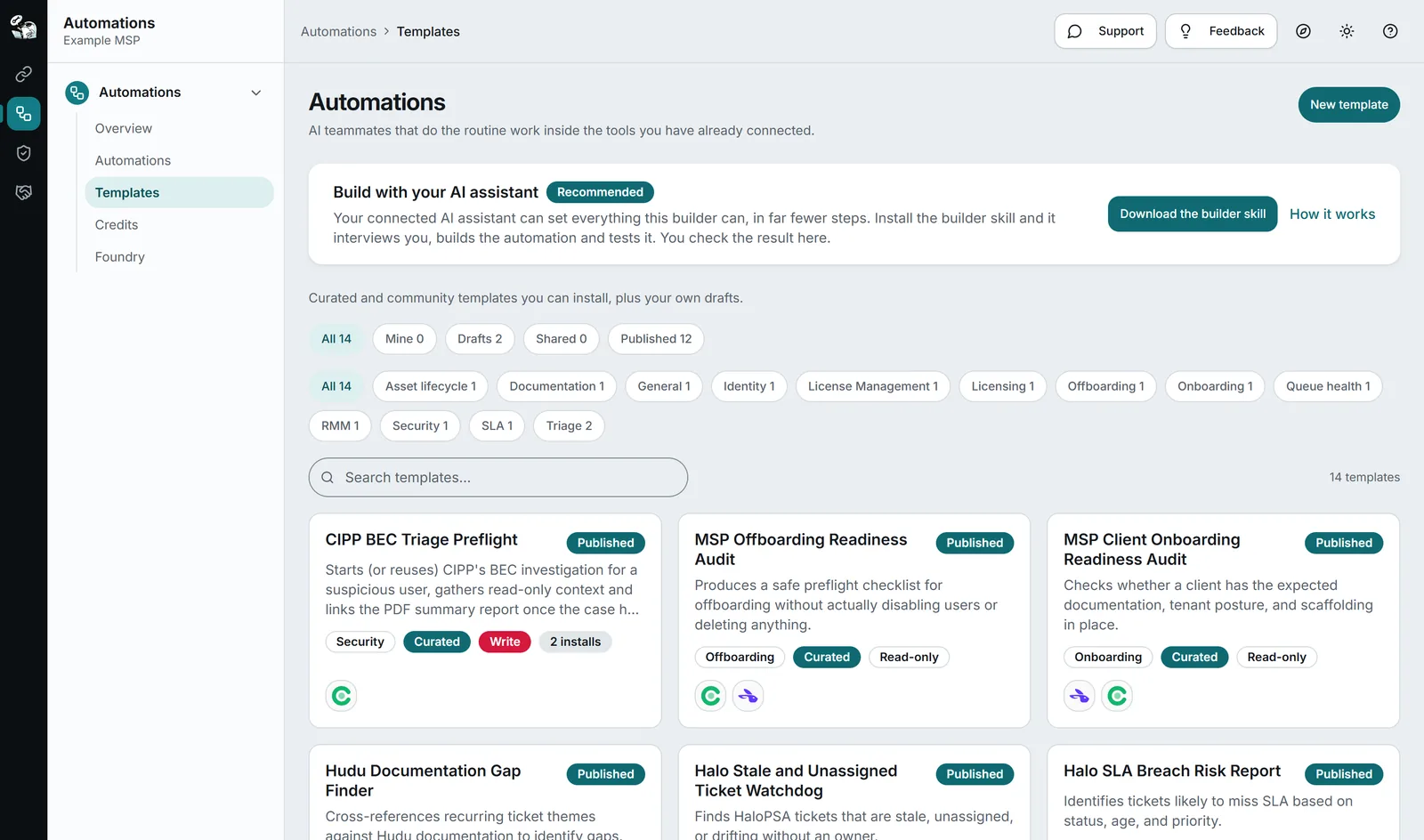
Start from a template. Publish your own.
Built-in templates, tenant-shared agents, and a moderated marketplace with versioning, risk badges, and safety scanning. Templates are parameterized, reviewable automation blueprints, not chaotic snippets.
Halo Stale and Unassigned Ticket Watchdog
Hudu Documentation Gap Finder
CIPP BEC Triage Preflight
Datto Device Warranty and Lifecycle Review
MSP Offboarding Readiness Audit
What an automation can look like.
Four examples of the shape an automation takes: recurring, cross-system, judgment-heavy. They show what is possible, not templates you must install.
Daily priority queue review
Reviews open priority tickets, pulls cross-system context from PSA + RMM + docs, flags SLA risks, and drops a briefing in the team channel before standup.
High-priority ticket triage
When a P1 fires, the agent gathers recent related tickets, client contacts, known assets, and documentation in seconds, posted directly to the ticket.
Documentation hygiene & drift
Checks IT Glue and Hudu for stale configs, missing passwords, expiring certs, and orphaned assets. Flags items before they become client-facing issues.
QBR prep brief
One click: the agent compiles a client’s ticket trends, asset posture, escalations, and open risks into a QBR-ready narrative with source citations.
Questions.
What knowledge sources can an agent use?
Today, Automations support three kinds of knowledge: pasted text, web pages (URLs) and uploaded documents. You can upload PDF, Word, Excel and PowerPoint files, and plain-text files such as Markdown, CSV and JSON. StackJack turns each file into text and adds it to the automation’s instructions on every run. One automation can carry up to 20 knowledge sources.
Can I share or publish agents?
Agents can be saved as templates (private, tenant-shared, or submitted to the marketplace). Templates are versioned, parameterized, and go through scanning + admin moderation with risk badges before publishing. So the marketplace is moderated, not a free-for-all.
Keep reading.
For depth, in the docs: What are automations · Templates · The guided wizard · The advanced builder · Build with your AI assistant · Knowledge sources
Recurring work, managed.
Automations are available today for every StackJack user. Run them on your Azure Foundry or your own Anthropic key for a flat monthly rate, or buy a credit pack to try one. Packs never expire, and you see real-time usage against your balance as your agents run.